
Support center
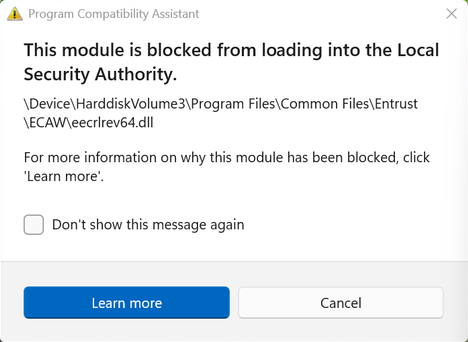
Entrust Client - "This module is blocked from loading into the Local Security Authority."
Audience
- A subscription to CertifiO Desktop
- Entrust Client installed
Notes
- This issue doesn’t affect the security, validity or compliance around your digital signature
- This issue is the result of a Microsoft-related limitation that prevents DLL files containing a timestamp from loading. At this time, Entrust have not yet received an estimated timeline from Microsoft regarding the resolution of this issue.
- Entrust will be releasing a ECAW version 12 in which their development team has re-engineered the product and will workaround the behavior. A timeline for this inclusion has not been determined.
Step 1
By dismissing the messages, the Client Entrust will still work properly:
- Check Don’t show this message again
- Click Cancel
- Repeat for all pop-ups messages
- Restart your computer and confirm that the pop-ups don’t show up
- If they are still showing, go to Step 2
Step 2
Technical process:
Be advised that you might need help from your IT department to perform those steps. Due to Admin rights, our team won’t be able to assist you if you are not full administrator on your computer or assisted by your IT.
As a temporary workaround, Entrust’s team has provided guidance to mitigate the impact. Please refer to the following technote for detailed instructions via the Windows Registry: Entrust Technote – 000127376_ ECAW11.0.11
Step 3
If this technote still don’t resolve the pop-ups, dismissing messages will still be the main workaround, but we do understand that it is not the expected behavior to use our product. As mentionned in the Notes section of this page, Entrust will be releasing a new version that will adress this behavior. Despite having no estimated release date, be assured that we will follow this situation closely to be the first to get acces to it.
In the meantime, please check whether your CertifiO Desktop subscription is available in its Cloud version. Availability depends on your professional association, but using CertifiO Cloud means Entrust does not need to be installed on your computer. If the Cloud version is not available to you, we recommend contacting your professional association to share your interest.
We thank you for your understanding and patience during the resolution of this issue beyond our control.